TL;DRRaal's asset register is a live record of every company device: who holds it, where it is, what condition it is in, whether it is MDM-compliant, and the full history of every action taken on it. It updates automatically with every device move Raal handles. It maps directly to ISO 27001 Annex A.8, A.11, and A.7, and to SOC 2 CC6.1 controls. Auditors get read-only access to pull evidence themselves. No spreadsheet exports. No manual updates before the audit.
The most common finding in an ISO 27001 pre-audit for distributed technology companies is not a missing policy or an incomplete risk assessment. It is an asset register that does not match reality.
A device that left the company six months ago is still listed as active. A new hire's laptop is in use but not yet added. A device is listed in Berlin but is actually in Warsaw. The spreadsheet was accurate when someone last touched it. Nobody can remember when that was.
Raal's asset register is designed so this problem does not exist. It updates itself. Every time a device ships, returns, is reassigned, or changes status, the register reflects it automatically. When an auditor asks to see your asset inventory, the answer is already there.
This article covers exactly how it works: what is tracked, how it stays current, and what it gives your auditor when they need evidence for ISO 27001 or SOC 2.
What Is the Raal Asset Register?
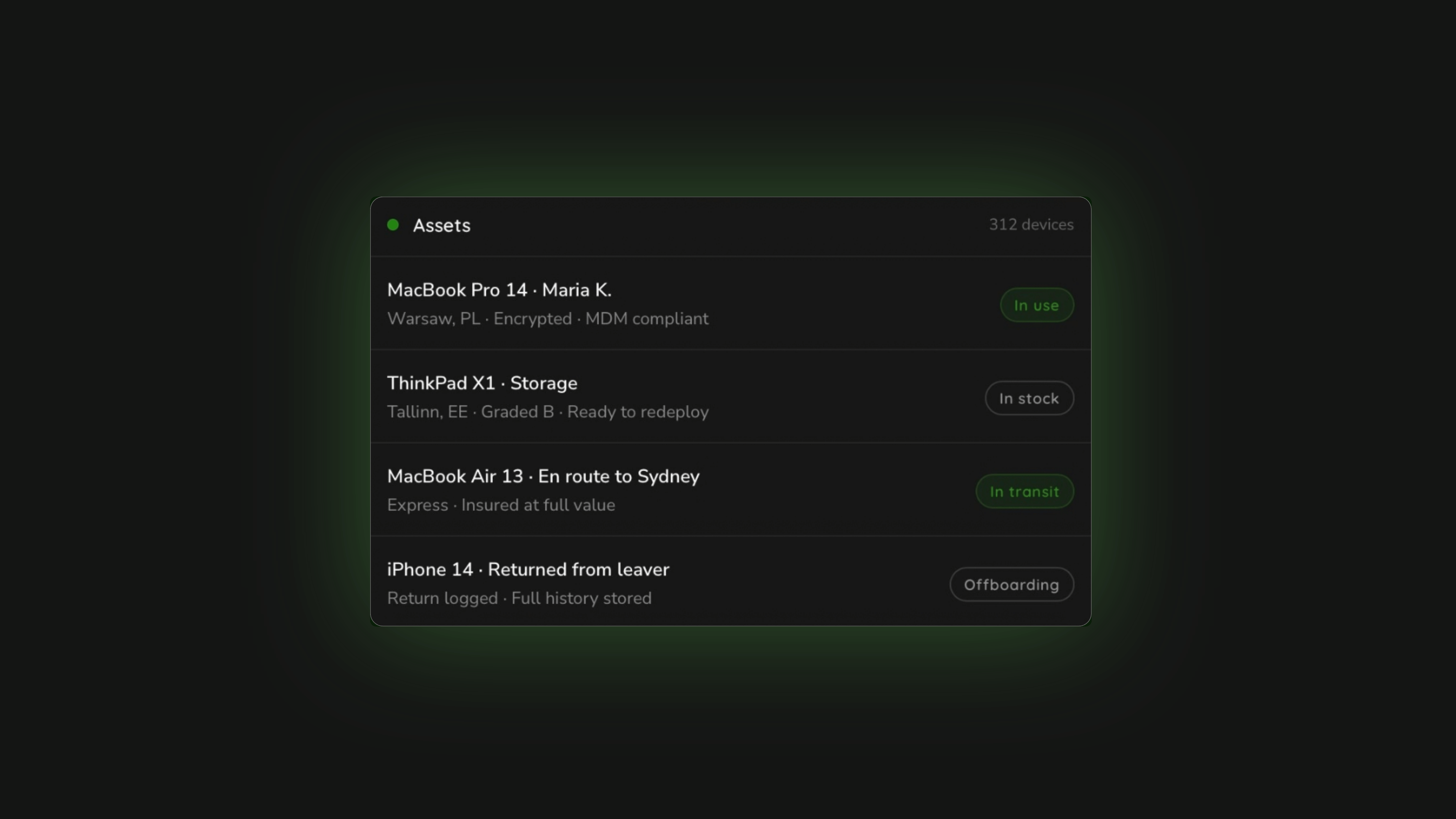
The Raal asset register is the central record of every IT device in your company's fleet. It is part of Raal's platform, included from the Starter plan upward, and it works in both directions: devices Raal ships and retrieves are tracked automatically, and you can import your existing fleet by CSV or add devices manually to get a complete picture from day one.
Think of it as the single source of truth for your hardware inventory. Not a backup of your MDM. Not an export from your HRIS. A dedicated register that knows where every device is, who has it, what state it is in, and what has happened to it since it was purchased.
What the Register Tracks: Every Field, Explained
Each device in the register has a complete record covering five categories of information.
Identity and specification
What is stored
- Make, model, and serial number
- Purchase date and supplier
- Warranty coverage and expiry date
- Original purchase cost
- Current depreciated value (calculated automatically based on purchase date and standard depreciation schedules)
- Insured value on every move Raal handles
Holder and location
What is stored
- Currently assigned employee (name and email)
- Assignment date (when the device was issued to this holder)
- Current physical location (country and address, updated with every Raal shipment)
- Full assignment history: every person who has held the device, with dates
Status and condition
What is stored
- Current status: Active, In Transit, In Stock, In Repair, Offboarding, Retired
- Condition grade: New, Good, Fair, Damaged
- Battery health and cycle count (where applicable)
- Functional check results from inspection on every return
- Physical audit state: Present (confirmed in physical audit), Not Found
Security posture
What is stored (synced from your MDM)
- MDM enrollment status and last check-in date
- Encryption state: FileVault or BitLocker active, with key escrow confirmation
- OS version: current version, flagged automatically when it falls behind your policy threshold
- EDR agent: which endpoint protection is running on the device
- Screen lock: enforced or not
- MDM compliance state at last sync
- Data classification: what class of data the device is approved to hold
Activity history
What is stored
- Every status change, with timestamp and the user who triggered it
- Every assignment and reassignment
- Every shipment, with courier tracking reference and delivery confirmation
- Every retrieval, with collection date and return confirmation
- Acceptance record: logged when a new holder receives and acknowledges the device
- Data destruction certificate: stored per device when it is retired, with date and method
How It Stays Current: The Automatic Update Logic
The register's accuracy comes from the fact that it is fed by logistics events, not by manual updates. Every time something happens to a device through Raal, the register reflects it without anyone having to remember to update a spreadsheet.
When a device ships to a new hire
The moment Raal creates a shipment, the device status changes to In Transit. The holder field updates to the incoming employee. When the courier confirms delivery, the status flips to Active and the location updates to the employee's address. The full shipment event, including courier tracking reference and delivery timestamp, is stored in the device's activity history.
When an offboarding starts
When a retrieval is initiated, the device status changes to Offboarding. Every step of the retrieval process is logged: packaging dispatched, employee communication sent, collection confirmed, device in transit. When the device arrives back at the designated location, the status changes to In Stock and the return is recorded with full details in the activity history.
When a device is reassigned
When a device in stock is assigned to a new hire, the holder field updates and a new assignment record is created. The previous holder's record is retained in the activity history. The device carries its complete history through every reassignment.
When you add devices manually or by import
Devices that Raal did not ship, existing fleet, devices managed by other providers, can be imported by CSV with a standard template or added individually. Once in the register, any subsequent Raal shipment or retrieval updates them automatically. The register becomes complete on day one and stays accurate from that point forward.
Related: IT Hardware Procurement for Remote Teams: A Practical Guide for 2026
What It Gives Your Auditor
This is where the register becomes a compliance tool rather than just an inventory. ISO 27001 and SOC 2 both require evidence that your organisation manages its IT assets in a controlled, documented way. The register provides that evidence directly, without requiring anyone to prepare a document pack before the audit.
Read-only auditor access
You invite your auditor as a read-only user in Raal. They log in and can see the full asset register, the complete activity history for any device, and the compliance state of every asset. They pull the evidence they need. You do not need to export spreadsheets, prepare summary documents, or coordinate a data gathering exercise before the audit.
ISO 27001 control mapping
ISO 27001 Controls Evidenced by the Raal Asset Register
5.9 Inventory of information and other associated assets
Organisations must maintain an inventory of information assets and other assets associated with information and processing facilities.
The register itself. Every device, with model, serial, holder, location, and status, always current.
5.10 Acceptable use of information and other associated assets
Rules for acceptable use and handling of assets must be identified, documented, and implemented.
Acceptance record logged on every device assignment. Timestamped confirmation that the holder received and acknowledged the asset policy.
5.11 Return of assets
Employees and external party users must return all assets belonging to the organisation upon termination of employment or contract.
Every retrieval logged with full activity trail: initiation, collection, return confirmation. Auditor can see the full offboarding record for any departed employee.
7.8 Physical security of equipment
Equipment must be protected against physical threats and environmental hazards.
Condition grading on every return, insured value on every transit, packaging standards recorded per shipment.
7.14 Secure disposal or re-use of equipment
Items of equipment containing storage media must be verified to ensure that any sensitive data and licensed software has been removed or securely overwritten prior to disposal or re-use.
Data destruction certificate stored per device. Date, method, and performing operator recorded. Retained against the asset record after the device leaves the fleet.
8.1 User endpoint devices
Information stored on, processed by, or accessible via user endpoint devices shall be protected.
Security posture per device: encryption state, MDM compliance, OS version, EDR agent, screen lock enforcement. Synced from MDM. Visible per device and exportable.
On SOC 2: SOC 2 Trust Services Criteria does not use the same control numbering as ISO 27001, but it asks for the same underlying evidence. CC6.1 (logical and physical access controls) and CC6.7 (restrictions on physical access) both require evidence of asset tracking and access management. The same register, the same auditor access, the same activity history covers both frameworks.
Related: Preparing for an ISO 27001 or SOC 2 Audit When Your Devices Are in 15 Countries
What the Register Does Not Do
It is important to be clear about what the asset register is not, so you can plan accordingly.
It does not replace your MDM. Your MDM (Jamf, Intune, Kandji, or similar) manages the devices: pushing apps, enforcing policies, running remote lock and wipe. The Raal register syncs compliance state from your MDM but does not control the device. The two systems are complementary, not competing.
It does not track software licences. The register covers physical hardware assets. Software licence management, SaaS subscriptions, and cloud resource tracking are out of scope. If you need software asset management alongside hardware, that is a separate tooling question.
It does not replace a formal ISMS. The register provides evidence for several ISO 27001 controls, but ISO 27001 certification requires a full Information Security Management System: risk assessments, policies, incident management processes, and internal audits. The asset register is one piece of the evidence picture, not the whole thing.
Related: MDM vs IT Asset Register: What Each Does, and Why You Need Both
How to Get Started
The register is included from Raal's Starter plan. If you are already a Raal customer, the register is accessible from the Assets tab in your portal. Devices Raal has shipped or retrieved are already there.
To add your existing fleet, use the CSV import template available in the portal. The template includes all required fields. A typical fleet of 50-200 devices can be imported in an afternoon.
To invite your auditor, add them as a read-only user in the team settings. They receive an invitation email and can access the register and activity history immediately. No data export required.
Book a demo to see the register live. We run the asset register on sample data in the demo so you can see exactly what an auditor would see. Book 30 minutes here.
FAQ
Does the asset register replace my MDM?
No. They do different things. Your MDM (Jamf, Intune, Kandji) manages devices: pushing configurations, enforcing policies, running remote wipe. Raal's asset register keeps the record: who holds each device, where it is, its full history, and the compliance state your MDM reports. The register syncs from your MDM and gives auditors a single place to see both the inventory and the security posture, but it does not control the devices.
Can I track devices that Raal never shipped?
Yes. Import your existing fleet using the CSV template in the portal, or add devices manually. Once in the register, any subsequent Raal shipment or retrieval updates those devices automatically. You can have a complete, accurate register from day one regardless of how the devices originally entered your fleet.
What does an ISO 27001 auditor actually see when they access the register?
They see the full asset list with all columns: model, serial, holder, status, condition, MDM compliance, audit state, assignment date, location. They can click any device to see its full activity history: every status change, every shipment, every retrieval, every assignment, with timestamps. They can also see the data destruction certificate for any retired device and the acceptance record for any assigned device. Everything ISO 27001 Annex A.8, 5.9, 5.10, 5.11, and 7.14 require is visible in a single view.
Which Raal plan includes the asset register?
The asset register is included from the Starter plan upward. The Pay As You Go (PAYG) plan covers transport only. See full plan details at raal.io/pricing.
How long does it take to get the register set up?
For a new Raal customer: devices Raal ships are in the register immediately. Importing an existing fleet by CSV typically takes an afternoon for a fleet of 50-200 devices. The CSV template is in the portal. No technical setup is required.
About Raal: Raal is a global IT device lifecycle platform. Ship, track, retrieve, and audit your device fleet across 150+ countries. Asset register included from Starter plan. See the asset management page. Book a demo.